WhatsApp Usernames Rollout: Business Readiness Guide
Business and Partner Readiness Guide
Audience | Businesses and partners using WhatsApp Business Platform through Engati |
|---|---|
Status | Prepared for Meta's phased usernames rollout in 2026 |
Engati readiness | Engati supports BSUID-based user identification so core conversation handling continues even when the user's phone number is unavailable. |
1. Introduction
Meta is rolling out WhatsApp usernames for businesses and end users. End users may choose a username and, in some cases, hide their phone number from businesses. Businesses can also reserve a username for their WhatsApp Business Platform phone number for branding and discoverability.
Important: This is not expected to break Engati's core WhatsApp conversation handling. Engati has already made the required platform-side changes to support Business-Scoped User IDs, or BSUIDs. |
|---|
Read more here - https://blog.whatsapp.com/its-time-to-reserve-your-whatsapp-username
2. What's Changing
- End users may use a WhatsApp username instead of exposing their phone number.
- When the phone number is not available, WhatsApp provides a Business-Scoped User ID, or BSUID, for user identification.
- A business username can be reserved for each WhatsApp Business Platform phone number.
- A business username does not hide the business phone number. It is for branding and discoverability.
- Journeys, CRM logic, reporting, exports, or integrations that require the user's phone number may need to be reviewed.
3. What Do You Need To Do As A Business
- Reserve Your Username
Reserve the preferred username for each WhatsApp Business Platform phone number. Usernames are expected to be first come, first served and should be secured early wherever available.
Steps To Reserve A Username
- Go to Meta Business Suite or Business Settings and open the relevant Business Profile / Business Portfolio - https://business.facebook.com/
- Go to Settings > WhatsApp accounts.
- Select the relevant WhatsApp Account.
- Click on WhatsApp Manager.
- In WhatsApp Manager, go to Account tools > Phone numbers.
- Select the relevant phone number.
- Open the Profile tab.
- Under Username, click Create.
- Choose an available reserved username or enter the preferred business username.
- Submit the request and track the status as reserved, approved, or active once Meta enables the feature broadly.
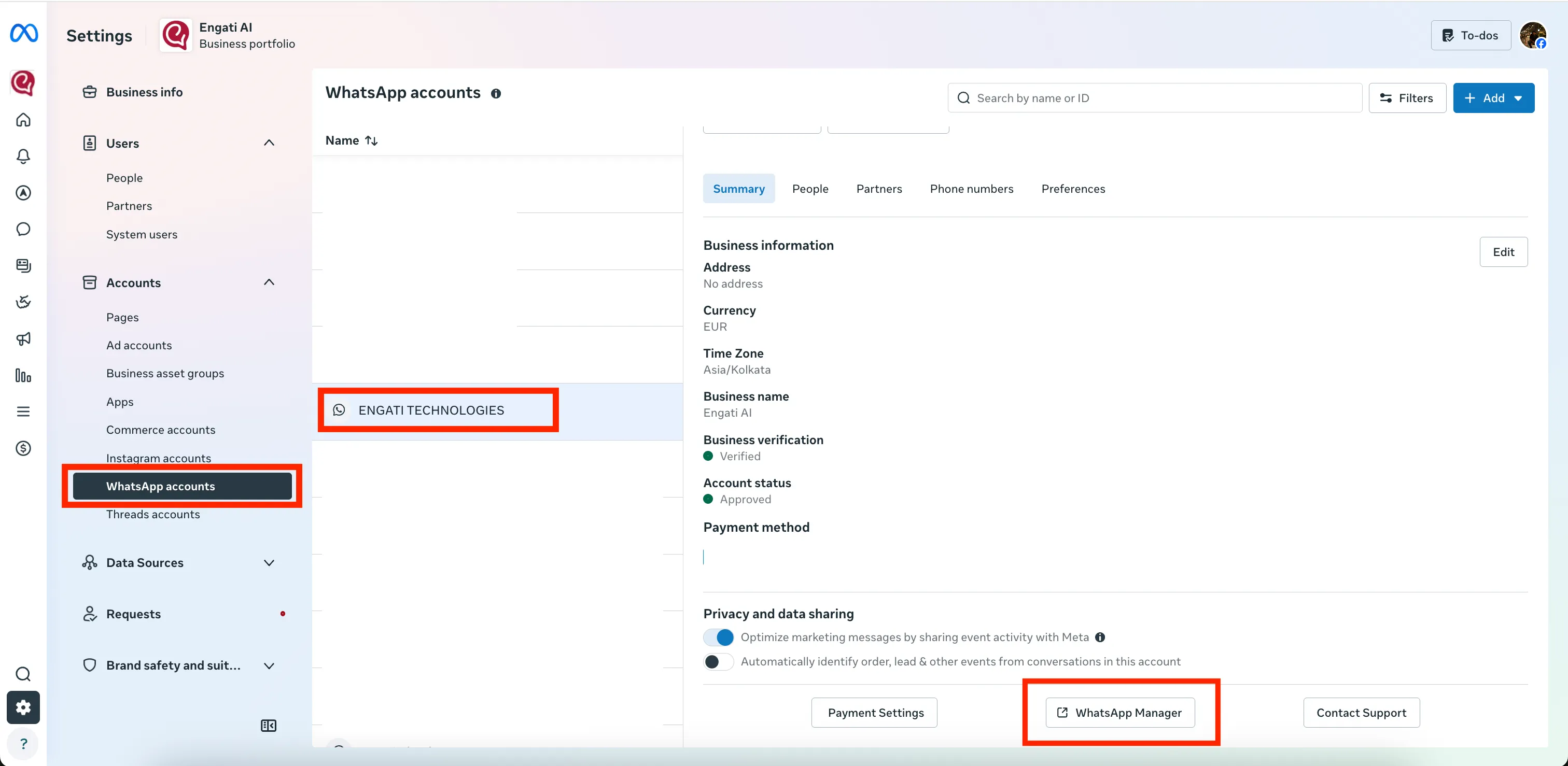
Screenshot 1: Select the WhatsApp account and open WhatsApp Manager.
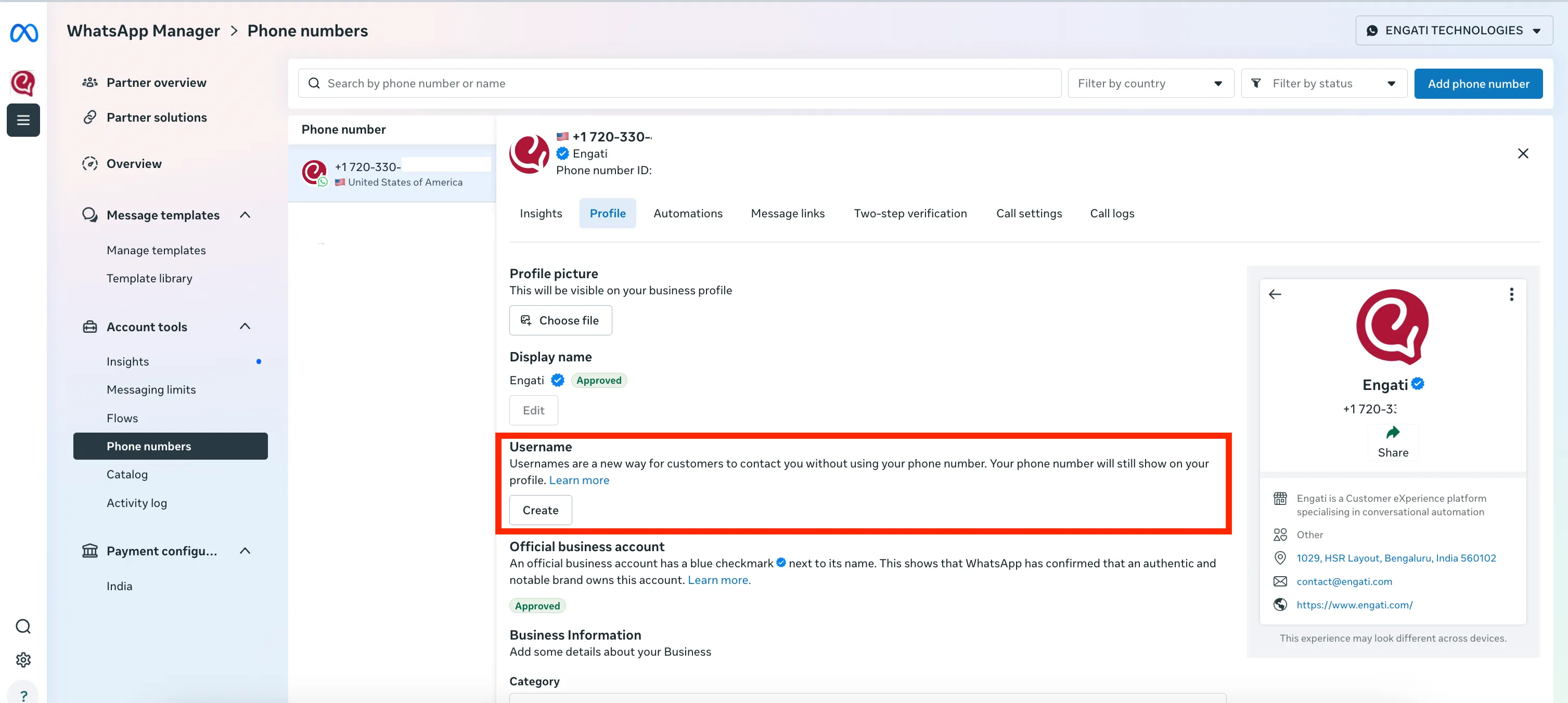
Screenshot 2: Select the phone number, open Profile, and click Create under Username.
- Review Flows And Journeys
Engati supports BSUID, so the system can continue identifying and handling users even if a phone number is not available. However, business journeys may still need changes if the journey itself depends on the user's phone number.
Review journeys where the phone number is used for:
- CRM lookup, lead matching, or deduplication
- Lead qualification, routing, assignment, or sales follow-up
- Offline callbacks, support escalation, or agent handoff
- Reports, exports, dashboards, or downstream data syncs
- Any custom integration where phone number is treated as mandatory
- Authentication or verification flows that require phone-number-based handling
Recommended flow change: If the phone number is required for the business process, explicitly ask the user to share it within the journey instead of assuming it will always be available from WhatsApp. We will be releasing access to WhatsApp phone number collection template once it's released by Meta, more details here - https://developers.facebook.com/documentation/business-messaging/whatsapp/business-scoped-user-ids/#requesting-phone-numbers-from-users |
|---|
4. What Do You Need To Do As A Partner
Partners should complete the same readiness actions for their own WhatsApp Business Platform numbers and also guide their end customers through the change.
- Reserve usernames for partner-owned WhatsApp Business Platform phone numbers.
- Inform customers that Engati supports BSUID, so the platform-side conversation experience is covered.
- Ask customers to review journeys where phone number capture is central to the business process.
- Help customers reserve their usernames from Meta Business Suite / WhatsApp Manager.
- Identify customers with custom CRM, webhook, reporting, or export dependencies on phone number.
- For managed accounts, confirm who owns the Business Portfolio, WABA, Page, and phone number so the right admin can complete the action.
5. FAQs
Question | Answer |
|---|---|
Will WhatsApp usernames break Engati conversations? | No. Engati supports BSUID-based user identification, so core conversation handling should continue even if the user's phone number is unavailable. |
What could still need changes? | Customer-specific journeys, reports, exports, CRMs, or integrations that require the user's phone number may need to explicitly collect the phone number from the user. |
Does a business username hide my business phone number? | No. Meta states that business usernames are for branding and discoverability. They do not hide the business phone number. |
Is a business username the same as the display name? | No. The display name identifies the business in the chat experience, while the username is a unique searchable handle tied to a specific WhatsApp phone number. |
How many usernames can a phone number have? | A WhatsApp phone number can have one business username at a time. |
When should businesses reserve the username? | As early as possible once the option is visible in Meta Business Suite or WhatsApp Manager, because preferred handles may not remain available. |
What if the username is already used by the Facebook Page or Instagram account? | The WhatsApp phone number may need to be linked to the relevant Facebook Page or Instagram account before claiming that username. |
What if the Create username option is not visible? | Check that the correct Business Portfolio, WhatsApp Account, and phone number are selected. Also confirm that the user has the required admin access and that the phone number is registered and active. |
Can users still share their phone number? | Yes. If the journey requires a phone number, the business can ask the user to share it as part of the WhatsApp journey. |
Useful Links
- Meta developer documentation: https://developers.facebook.com/documentation/business-messaging/whatsapp/business-scoped-user-ids/
- Meta Help Centre: https://www.facebook.com/business/help/4631406400243963